Computer Science Revision Theory: Components, Networks, and Security
Document from University about Computer Science Revision Theory. The Pdf, a concise theoretical revision for university students, covers fundamental computer science concepts including CPU, memory systems, internet workings, network types, and data transmission, ideal for quick and targeted study.
See more11 Pages

Unlock the full PDF for free
Sign up to get full access to the document and start transforming it with AI.
Preview
Computer Components Overview
Computer Science Revision Theory:
- Control Unit
- ALU
- Memory registers (MAR and MDR)
- Internal/Main memory (RAM and
cache) - Secondary storage (Hard Drive)
Input Unit Functionality
Input Unit
. Sends electrical signals to the
CPU .
- Keyboard, Trackpad, Touch Screen,
Microphone, Scanner, Camera
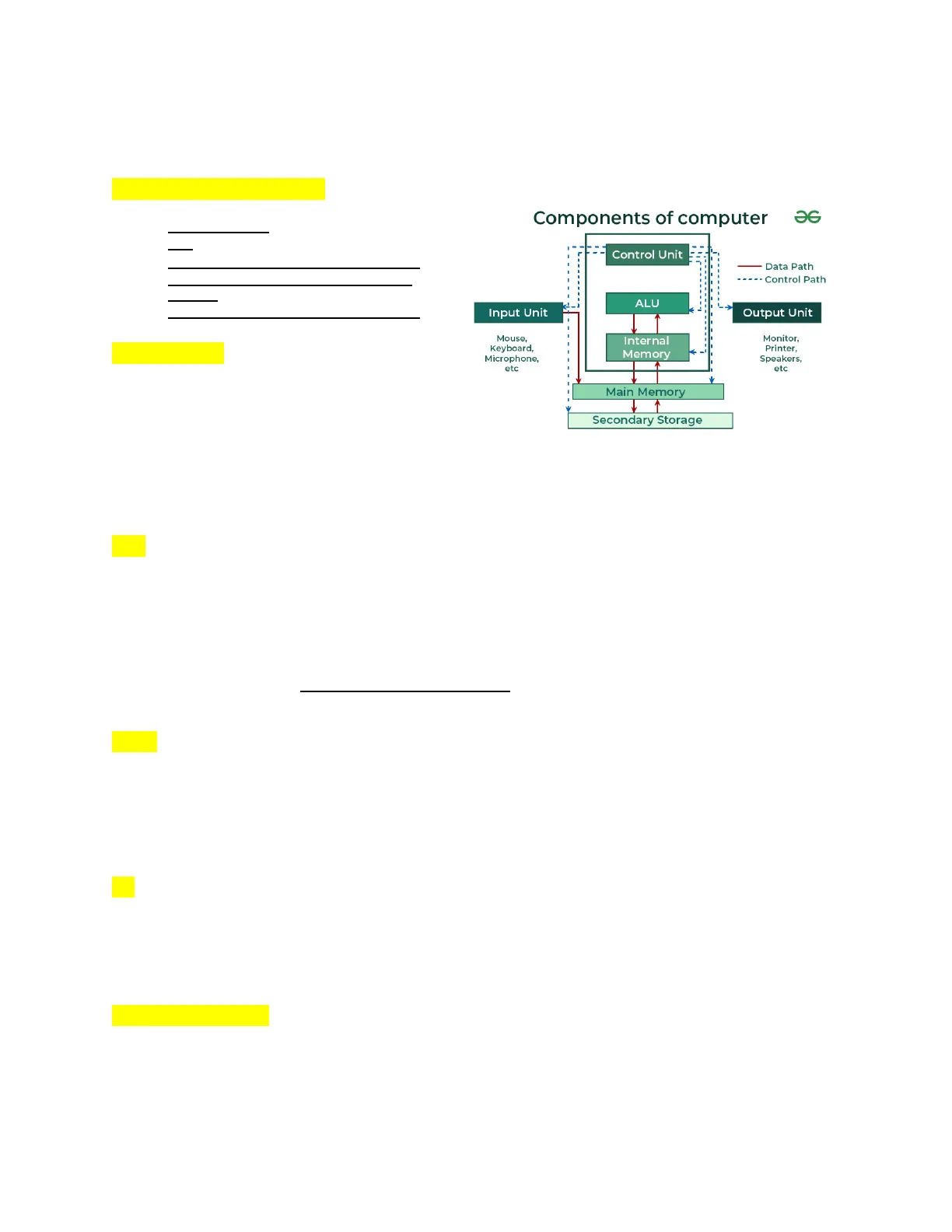
Components of computer 36
Control Unit
- Data Path
..... Control Path
ALU
Input Unit
Output Unit
Mouse,
Keyboard,
Microphone,
etc
Internal
Memory
Monitor,
Printer,
Speakers,
etc
Main Memory
Secondary Storage
0 These are various input
devices used to send data into the computer. They allow the user to
interact with the computer by inputting text, commands, audio, images,
and other forms of data.
Central Processing Unit (CPU)
- Processing Data
- The CPU is responsible for processing data, performing mathematical
calculations, and executing instructions. - It is the brain of the computer.
- It requires memory to store data and instructions temporarily while
processing. - Contains CU, ALU, and memory units. Inputs go into the CPU and outputs
come out of it.
- The CPU is responsible for processing data, performing mathematical
Arithmetic Logic Unit (ALU)
- Mathematical Operations
- The ALU performs all arithmetic operations such as addition, subtraction,
multiplication, and powers. These operations are fundamental and very
fast, capable of performing millions of additions per second. - It also handles data comparison and logical operations.
- The ALU performs all arithmetic operations such as addition, subtraction,
Control Unit (CU)
- Directing Operations
- The CU directs the operations of the CPU by telling the ALU what to
process next. It manages the flow of data within the CPU and coordinates
the activities of other components.
- The CU directs the operations of the CPU by telling the ALU what to
Memory Systems
RAM (Random Access Memory)
. RAM (Random Access Memory)
-
- RAM is the primary memory where all currently open applications and data
are stored. It is volatile memory, meaning it gets cleared when thecomputer is restarted. Overloading RAM with too many applications can
slow down the computer. It also reads and writes. - ROM stands for Read-Only Memory. It is a type of non-volatile storage
used in computers and other electronic devices to store data that does
not change and must remain available even when the device is powered off.
- RAM is the primary memory where all currently open applications and data
Cache Memory
- Cache Memory
- Cache memory stores frequently accessed data temporarily for quick
retrieval. For example, it might store frequently typed letters or words
to recommend them to the user.
- Cache memory stores frequently accessed data temporarily for quick
Hard Drive Storage
. Hard Drive
-
- The hard drive is secondary memory, used for long-term storage of
applications, files, and documents. It acts as virtual memory when RAM is
full, providing additional storage space to prevent the computer from
slowing down. It retains data even when the computer is turned off.
- The hard drive is secondary memory, used for long-term storage of
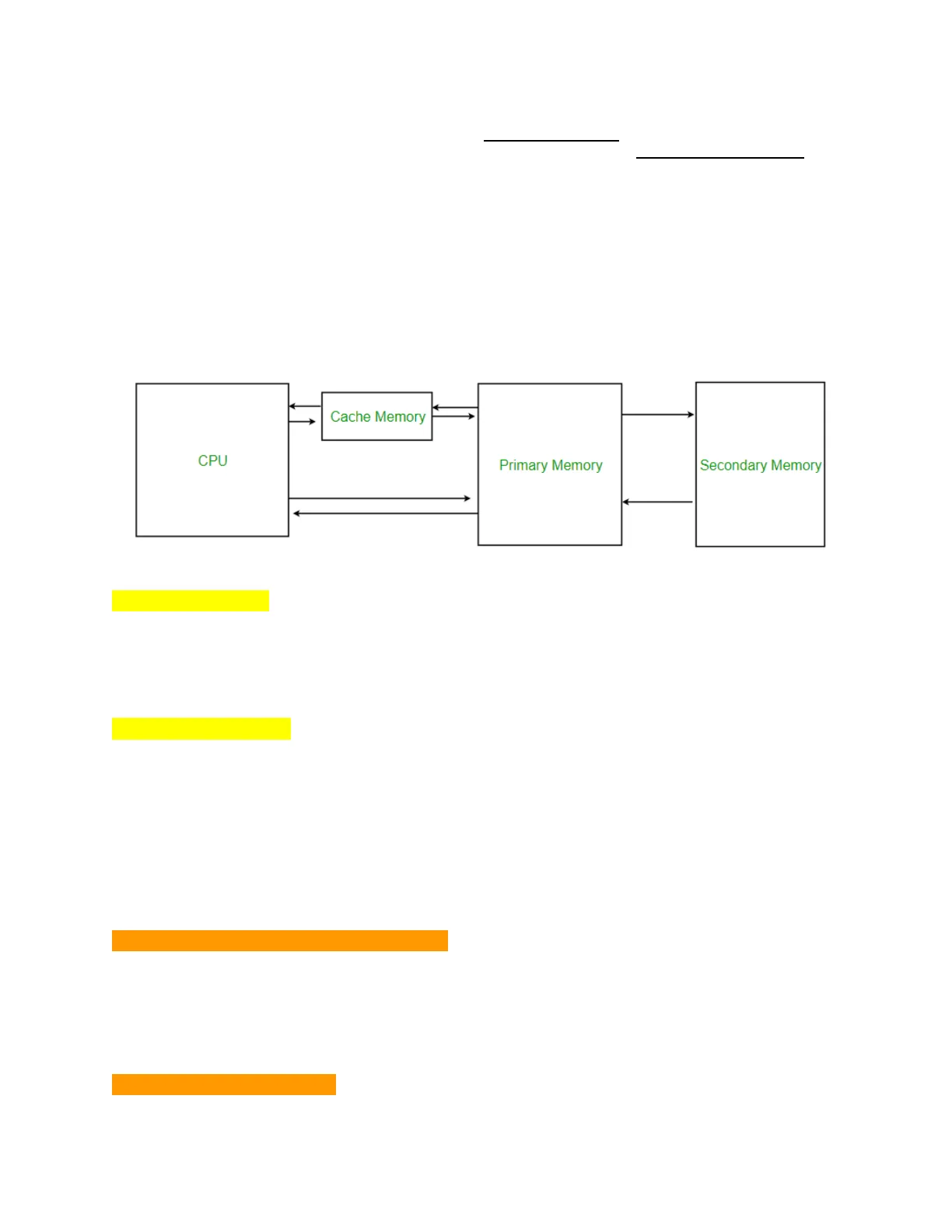
Cache Memory
CPU
Primary Memory
Secondary Memory
Output Devices
- Screen, Printer
- These devices produce output from the computer. The screen displays
visual output, while the printer produces physical copies of documents
and images.
- These devices produce output from the computer. The screen displays
Memory Registers
. They have a role of temporarily holding the data that is being used or
transferred, or the address of the data that needs to be read.
Memory Address Register (MAR)
. Memory Address Register (MAR)
-
- The MAR holds the address of the data that needs to be read from or
written to memory. It acts as a pointer to the location of the data.
- The MAR holds the address of the data that needs to be read from or
Memory Data Register (MDR)
- Memory Data Register (MDR)
- The MDR stores the actual data being transferred to or from the memory.
It works in conjunction with the MAR to manage data flow between the CPU
and memory. It is in the CU.
- The MDR stores the actual data being transferred to or from the memory.
Basic Computer Operations
Add, Read, Write, Compare
-
- These are the fundamental operations that a computer performs. Addition
is the basis for other arithmetic operations, reading and writing are
essential for data management, and comparison is used in decision-making
processes.
- These are the fundamental operations that a computer performs. Addition
Bits and Transistors
Bits
- Bits
- Bits are the basic units of memory in a computer. They represent data in
binary form (0s and 1s) .
- Bits are the basic units of memory in a computer. They represent data in
Transistors (Silicon)
- Transistors (Silicon)
- Transistors are semiconductor devices used to amplify or switch
electronic signals. They are the building blocks of computer circuits,
made from silicon, which has properties between metals and nonmetals.
- Transistors are semiconductor devices used to amplify or switch
Hardware vs. Software
Hardware Components
- Hardware
- It's the physical component of a computer, like a monitor, computer
tower, keyboard, trackpad, speaker, etc. - RAM is composed of silicon atoms and capacitors, which store electric
charge. - Electrical signals are sent to the CPU by the input devices, with a
frequency indicating binary states:
- 0 = no flow
- 1 = flow
- It's the physical component of a computer, like a monitor, computer
Software Components
- Software
- Has to do with digital components that control the hardware.
- Software interprets key combinations on an alphabet keyboard using 8-bit
binary codes (256 possible combinations) . - ROM (Read-Only Memory) retains essential information about the machine
and startup processes even when the computer is shut down.
Memory Types
- Primary Memory (RAM)
- Volatile memory used for currently active processes and data.
- Secondary Memory (Hard Drive)
Non-volatile storage for long-term data and applications.
○
. Cache Memory
-
- Temporarily stores frequently accessed data for quick access.
. ROM (Read-Only Memory)
-
- Non-volatile memory that retains essential startup information.
Binary Codes and Key Combinations
- Binary Codes
- Each key on an alphabet keyboard is interpreted using 8 binary digits
(bits) , either 0 or 1. - Example: The letter "A" is represented as 1000001.
- Each key on an alphabet keyboard is interpreted using 8 binary digits
Graphics Processing Unit (GPU)
- GPU
- A specialized processor for handling graphics operations.
Character Encoding
ASCII Encoding
- ASCII
(American Standard Code for Information Interchange)- A table that maps each key on a keyboard to a byte.
- Only contains alphabet characters.
- Uses 8 bits per character.
UNICODE (UTF-8)
. UNICODE (UTF-8)
-
- Replaced ASCII to include characters from other languages.
- Uses 16 bits per character.
Extended Character Sets
- Extended Character Sets
- Support for additional characters and languages beyond the basic
alphabet.
- Support for additional characters and languages beyond the basic
Machine Instruction Cycle
- Fetch the Instruction
- The instruction is fetched from the memory address stored in the Program
Counter. - The instruction is then stored in the Instruction Register (IR) .
- The Program Counter is updated to point to the next instruction.
- The instruction is fetched from the memory address stored in the Program
. Decode the Instruction
-
- The Program Counter determines the type of instruction (adding,
comparing, reading, writing) .
- The Program Counter determines the type of instruction (adding,
- Execute the Instruction
- The CPU performs the specified operation.
- Store the Result
- The result of the operation is stored in the appropriate location.
Data Units
Bit
- Bit
- The smallest unit of data.
- Abbreviation for a binary digit, represented as 0 or 1.
Byte
- Byte
- A sequence of 8 bits.
- With one byte, there are 256 possible values (2^8) .
Binary Number System
Binary
. Definition
- Uses two digits: 0 and 1.
- Each digit represents a power of 2.
- The fundamental numbering system used in digital electronics and
computing.
Conversions Between Bases
Binary to Decimal Conversion
- Binary to Decimal
- Convert each binary digit to its decimal equivalent and sum the results.
- Example: 1101 in binary:
1×23+1×22+0×21+1×201×23+1×22+0×21+1×20
=8+4+0+1=8+4+0+1
=13=13 (decimal)
Decimal to Binary Conversion
. Decimal to Binary
-
- Divide the decimal number by 2 and record the remainder.
- Continue dividing the quotient by 2 until the quotient is 0.
- The binary number is the sequence of remainders read from bottom to top.
- Example: 18 in decimal to binary:
18 : 2 = 9, remainder = 09 + 2 = 4, remainder = 1
4 + 2 = 2, remainder = 0
2 + 2 = 1, remainder = 0
1 - 2 = 0, remainder = 1
Reading remainders from bottom to top: 10010 (binary)
Common Binary Applications
Computing and Digital Electronics
- Computing and Digital Electronics
- Binary is the language of computers, where 0 and 1 represent off and on
states, respectively. - Used in data representation, machine instructions, and memory addressing.
- Binary is the language of computers, where 0 and 1 represent off and on
Binary Arithmetic
. Binary Arithmetic
-
- Addition, subtraction, multiplication, and division operations can be
performed using binary numbers.
- Addition, subtraction, multiplication, and division operations can be
- Example: Binary addition
- 101101
110110
10111011
- 101101
Summary of Binary Representation
. Binary (Base 2)
-
- Uses two digits: 0 and 1.
- Each digit's position represents a power of 2.
- Essential for digital systems and computing.
. Base 8 (Octal) - slightly unimportant
-
- Definition
- Uses eight digits: 0, 1, 2, 3, 4, 5, 6, 7.
- Each digit represents a power of 8.
- Example
- The octal number 157 in decimal:
1×82+5×81+7×801×82+5×81+7×80
=1×64+5×8+7×1=1x64+5×8+7x1
=64+40+7=64+40+7
=111=111 (decimal)
- The octal number 157 in decimal:
- Definition
. Base 10 (Decimal)
0 Definition
-
-
- Uses ten digits: 0, 1, 2, 3, 4, 5, 6, 7, 8, 9.
- Each digit represents a power of 10.
- The standard numbering system used in everyday life.
- Example
- The decimal number 345:
3×10²+4×101+5×1003×102+4×101+5×100
=3×100+4×10+5×1=3×100+4×10+5×1
=300+40+5=300+40+5
=345=345 (decimal)
- The decimal number 345:
-
. Base 16 (Hexadecimal)
0 DefinitionUses sixteen digits: 0-9 and A-F (where A=10, B=11, C=12,
D=13, E=14, F=15) .
" Each digit represents a power of 16.
-
-
- Commonly used in computing for memory addresses and color
codes.
- Commonly used in computing for memory addresses and color
- Example
- The hexadecimal number 2F3 in decimal:
2×162+Fx161+3×1602×162+Fx161+3×160
=2×256+15×16+3×1=2x256+15×16+3×1
=512+240+3=512+240+3
=755=755 (decimal)
- The hexadecimal number 2F3 in decimal:
-
Summary of Base Conversions
. Each base represents numbers using its own set of digits and positional values:
-
- Base 2: 0, 1
- Base 3: 0, 1, 2
- Base 4: 0, 1, 2, 3
- Base 6: 0, 1, 2, 3, 4, 5
- Base 8: 0, 1, 2, 3, 4, 5, 6, 7
- Base 10: 0, 1, 2, 3, 4, 5, 6, 7, 8, 9
- Base 16: 0, 1, 2, 3, 4, 5, 6, 7, 8, 9, A, B, C, D, E, F
Examples of Data Sizes
Character Representation
. Character Representation
-
- 'A' = 1 byte
- 'Monday' = 6 bytes
Common Data Sizes
- Common Data Sizes
- Plain-text email (regular email) = 2 KB
- 64 pixel x 64 pixel GIF = 12 KB
- Hi-res 2000 x 2000 pixel RAW photo = 11.4 MB
- Three-minute MP3 audio file = 3 MB
Binary Representations
Types of Data
. Types of Data
Binary data can represent different types of information:
-
-
- String: Example: "I love Java"
- Integer: Example: 12, 34, 3345
- Characters: Uses ASCII or UNICODE encoding
-
" Colors: Represented in HEX (hexadecimals)
Determining Data Type
- Determining Data Type
- Example: 10101111
- Could be an integer, character, or color.
- The computer determines the type from the initial digits (header) .
Color Representation in Computers
Primary Colors
- Primary Colors
- Red, Green, Blue (RGB) .
- Different concentrations of these three colors combine to create other
colors.
RGB Triplet
- RGB Triplet
- Colors in a single pixel are represented using an RGB triplet.
Can’t find what you’re looking for?
Explore more topics in the Algor library or create your own materials with AI.