OS Week 7: Lab File Primitives in Python for University Students
Document from University of Portsmouth about OS Week 7 - Lab File Primitives - (Python version). The Pdf explores file operations in Python, including creation, deletion, reading, writing, random access, and attribute management. This material is designed for university computer science students.
See more8 Pages


Unlock the full PDF for free
Sign up to get full access to the document and start transforming it with AI.
Preview
File Primitives in Python
If you haven't already done so, read the introductory slides of the week 7 lecture on file systems. These slides introduce various file operations, such as creating, deleting, reading, and writing files. This lab will illustrate these operations in Python.
That lecture identifies around ten primitive operations on files, including:
- Create named file
- Delete named file
- Open named file
- Close a file
- Read from open file
- Write to open file
- Seek in open file
- Get attributes of file
- Set attributes of file
- Rename a file
Examples in this lab will illustrate most of these in action. An important theme will be associating these operations with underlying system calls using Python's os and shutil libraries.
Creating Files
Experiment 1: Creating Files with Python
Here's a Python program that creates two files:
Python import os # Create file paths dum_path = "tweedle-dum. txt" dee_path = "tweedle-dee. txt"
# Create files with open(dum_path, 'w') as dum, open(dee_path, 'w') as dee: pass This code creates two files, tweedle-dum. txt and tweedle-dee. txt, in the current working directory.
If the above code does not work directly then you may add the correct path before the file name and use forward slashes ("/").
Example, "C:/Users/elboghdt/Desktop/Python/tweedle-dee.txt". You can read more about Python Handling here.
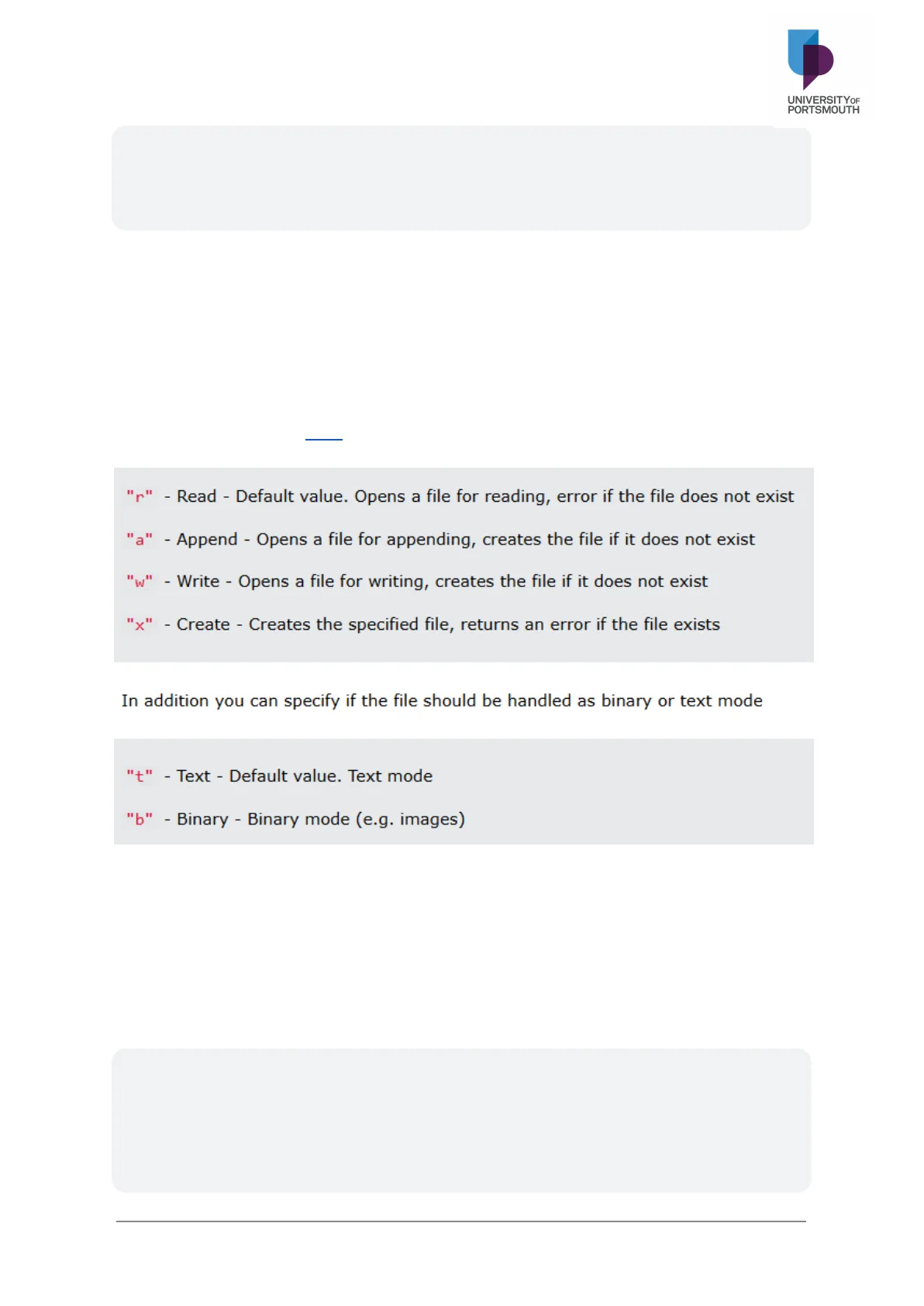
- "r" - Read - Default value. Opens a file for reading, error if the file does not exist
- "a" - Append - Opens a file for appending, creates the file if it does not exist
- "w" - Write - Opens a file for writing, creates the file if it does not exist
- "x" - Create - Creates the specified file, returns an error if the file exists
In addition you can specify if the file should be handled as binary or text mode
- "t" - Text - Default value. Text mode
- "b" - Binary - Binary mode (e.g. images)
Deleting Files
Experiment 2: Deleting Files with Python
Now, delete the files with this code:
Python import os # Paths to files dum_path = "tweedle-dum. txt" dee_path = "tweedle-dee. txt"
# Delete files if os.path.exists(dum_path) : os. remove (dum_path) if os.path.exists(dee_path) : os. remove (dee_path) Check if the files exist before deleting to avoid errors if the files are not found.
Opening Files
Various programming languages provide explicit open calls that "open" files for reading or writing. These function calls are either direct system calls or interfaces to an underlying system call. What the underlying system call typically does is read from disk the metadata describing a file, loading this metadata into data structures that the operating system maintains in memory.
Reading Files
Experiment 3: Reading File Content
Recreate tweedle-dum. txt, from experiment 1, add some text, and then read the first 100 characters. If you wish, you can add the following text to your file.
Tweedledum and Tweedledee Agreed to have a battle; For Tweedledum said Tweedledee Had spoiled his nice new rattle.
Just then flew down a monstrous crow, As black as a tar-barrel; Which frightened both the heroes so, They quite forgot their quarrel.
Or you can use the following code directly to create a file and add content.
Python # Create file and add content with open( "tweedle-dum. txt", 'w' ) as file: file. write("Tweedledum and Tweedledee agreed to have a battle; For Tweedledum said Tweedledee had spoiled his nice new rattle.")
# Read first 100 characters with open( "tweedle-dum. txt", 'r') as file: data = file. read(100) print (data)
Experiment 4: Reading File Content in Chunks
Modify the code to read and print the entire file content in chunks of 100 characters, or you may remove it and just use file.read():
Python with open( "tweedle-dum. txt", 'r') as file: while chunk := file. read (100) : print (chunk, end="") Run the new program to print out the whole file.
There are a few points to notice here:
- The read method is called several times, each time reading up to 100 characters, until the file is exhausted. Typically all calls but the last will return the full 100 characters; the last call will return whatever is left over at the end of the file.
- Implicitly, a seek pointer, which defines the current position in the file, is increased after each call by the amount of data read (see slide 6 in the week 7 lecture).
- When the file is exhausted, the next read call returns the value -1. (This is a departure from the traditional UNIX system call read, which returns 0 in this circumstance).
Closing a Files
The with statement automatically takes care of closing the file once it leaves the with block, even in cases of error. I highly recommend that you use the with statement as much as possible, as it allows for cleaner code and makes handling any unexpected errors easier for you.
Writing to Files
Experiment 5: Writing a String to a File
Write a string to tweedle-dee. txt:
Python text = "Shoes and ships and sealing wax." with open( "tweedle-dee. txt", 'w' ) as file: file.write(text) Check the content of the file.
Experiment 6: Combining Reading and Writing Files
Here is another more elaborate program that combines reading and writing files. Copy contents of tweedle-dum. txt to tweedle-dee. txt:
Python with open( "tweedle-dum. txt", 'r' ) as source, open("tweedle-dee. txt", 'w' ) as destination : for chunk in iter(lambda: source.read(100), '') : destination.write(chunk)
Seeking a Files / Random Access in Files
When a file is opened for reading or writing, a seek pointer internal to the operating system is initialized so that it points to the first byte of the file. This pointer is increased after every read or write operation, so that the next read or write starts with the byte immediately following the last byte processed so far. This is called sequential access to the file.
In random access, a read or write is applied to any chosen location in the file, regardless of where bytes were read or written previously. This akin to the situation with Random Access Memory.
Random access is not the default for files - presumably because sequential access is such a common requirement. In most operating systems, random access to a file is implemented through an operation that sets the seek pointer to some value chosen by the programmer. This new operation is invoked prior to an ordinary read or write, which then starts processing from the chosen point.
Experiment 7: Random Access with File Seek
Random access can be achieved using file object methods like seek:
Python with open( "tweedle-dum. txt", 'rb' ) as file: file. seek (100) # Move to byte 100 print(file.read(100).decode()) This seeks to byte 100 in the file, then reads the next 100 bytes.
Experiment 8: Writing to a Random Position
Try writing to a random position:
Python with open( "tweedle-dum. txt", 'r+b' ) as file: file. seek (100) file.write(b"Random insert at 100.") Try writing to a position within the file (e.g. seek pointer 100), and also to a position beyond the current limit of the file (e.g. seek pointer 100,000). What effect does the latter operation have?
Getting Attributes of a File
Experiment 9: Displaying File Attributes
Display attributes of tweedle-dum. txt:
Python import os file_path = "tweedle-dum. txt" print("Is a directory? : ", os. path. isdir (file_path) ) print( "Is a file ?: ", os. path. isfile(file_path) ) print("File size:", os.path. getsize(file_path) ) print("Last modified:", os. path. getmtime (file_path) ) print("Can be read? : ", os. access(file_path, os. R_OK) ) print("Can be written ?: ", os. access(file_path, os. W_OK) )
Additional Exercises
- Setting Attributes of a File
- Renaming a File
- Directory Manipulation: Use os . mkdir and os . listdir.
- Recursive File Copying: Try copying all files in a directory, including subdirectories (hint: shutil. copytree).
Reflection Question
For each of the sections above illustrating a particular primitive operation, try to find the name of the POSIX system call corresponding to the Python methods you used (in some cases the correspondences will be fairly obvious!)
A useful resource is: http://man7.org/Linux/man-pages/dir section 2. html These are actually the Linux system calls. The ones we are interested in are POSIX compliant, and thus more widely implemented. So, if you use the resource above, look for calls that are POSIX compliant (check the "CONFORMING TO" section at the bottom of most of the individual manual pages).
Can’t find what you’re looking for?
Explore more topics in the Algor library or create your own materials with AI.